Beginner’s Guide to Docker
Docker is a platform that allows you to package an application together with everything it needs to run—such as dependencies, libraries, and configuration—into a container.
The main idea is simple:
Build once. Run anywhere.
Why Docker?
Without Docker, an application might work perfectly on your computer but fail on another machine because of different Node.js versions, Python versions, dependencies, or system configurations.
Docker solves this by creating a consistent environment for your application.
Instead of saying:
“It works on my machine.”
You can package the environment itself and run the same application almost anywhere.
Container vs Virtual Machine
- A virtual machine includes an entire operating system.
- A Docker container shares the host system's kernel and only contains what the application needs.
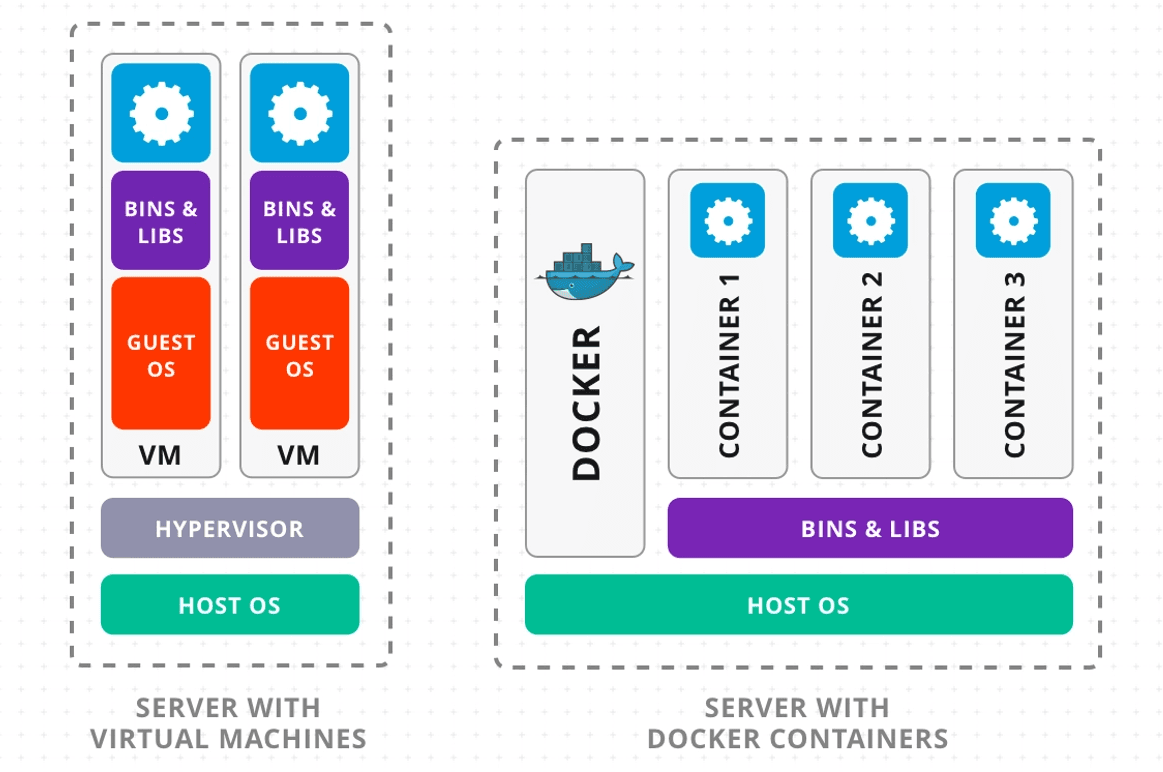
This makes containers generally:
- Lightweight
- Fast to start
- Easy to reproduce
- Easy to deploy
- Simple to scale
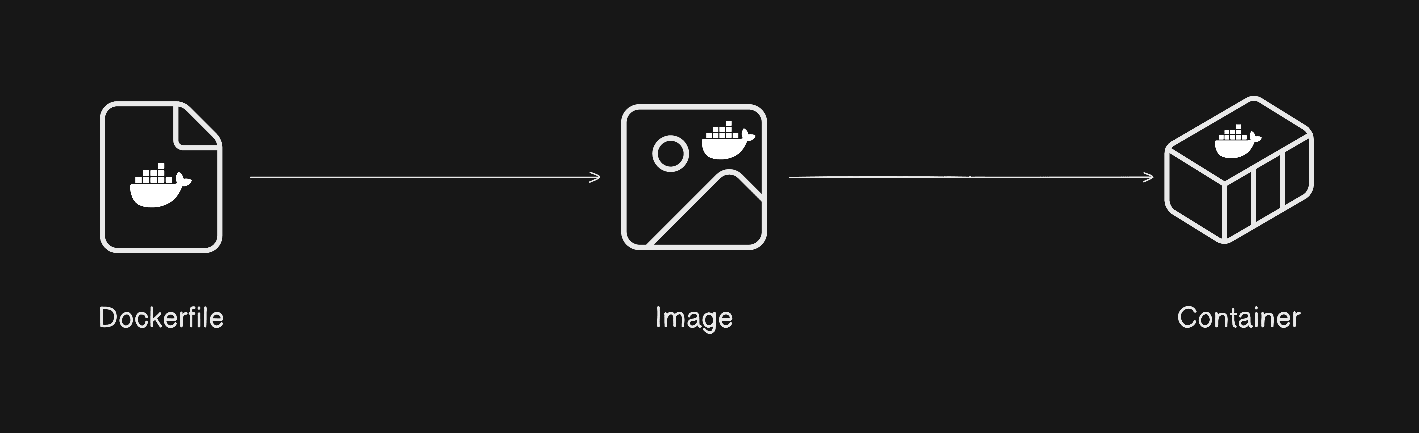
The 3 Docker Concepts You Need
- Image
An image is a blueprint for your application. It contains the code, dependencies, and instructions needed to create a container. - Container
A container is a running instance of an image. - Dockerfile
A Dockerfile is a set of instructions used to build an image.
The relationship is:
Your First Dockerfile
For a simple Node.js application:
FROM node:22

WORKDIR /app

COPY package*.json ./
RUN npm install

COPY . .

EXPOSE 3000

CMD ["npm", "start"]
Build the image:
docker build -t my-app .Run it:
docker run -p 3000:3000 my-appYour application can now be accessed through:
http://localhost:3000Useful Docker Commands
- View available images.
docker images- View running containers.
docker ps- View all containers.
docker ps -a- Stop a container.
docker rm <container>- Remove an image.
docker rmi <image>What About Docker Compose?
When an application has multiple services—such as a React frontend, Node.js API, PostgreSQL database, and Redis—running each container manually becomes inconvenient.
That's where Docker Compose comes in.
You can define your entire application stack in one configuration file:
services:
  app:
    build: .
    ports:
      - "3000:3000"
    depends_on:
      - db

  db:
    image: postgres:17
    environment:
      POSTGRES_USER: postgres
      POSTGRES_PASSWORD: password
      POSTGRES_DB: myapp
    ports:
      - "5432:5432"
The Structure is simply:
Docker Compose
│
├── app
│   └── Node.js application
│
└── db
    └── PostgreSQL
Start everything with:
docker compose upDocker Compose lets these services run together as one development environment.
When Should You Use Docker?
Docker becomes especially useful when you:
- Work on team projects
- Build applications with multiple services
- Need consistent development environments
- Deploy applications to servers
- Work with different versions of databases or runtimes
- Want to reproduce production environments locally