DNS Explained: How the Internet Finds Websites
Have you ever wondered what happens when you type google.com into your browser?
Your computer doesn't actually know where google.com is. Computers communicate using IP addresses, such as 142.250.x.x. DNS is what connects the domain name to that IP address.
What is DNS?
DNS stands for Domain Name System.
You can think of DNS as the internet's phone book.
Instead of remembering an IP address like:
142.250.x.x
we can simply use:
google.com
DNS finds the IP address associated with that domain.

What happens when you visit a website?
When you enter:
https://example.com
your browser needs to find the server hosting that website.
A simplified process looks like this:
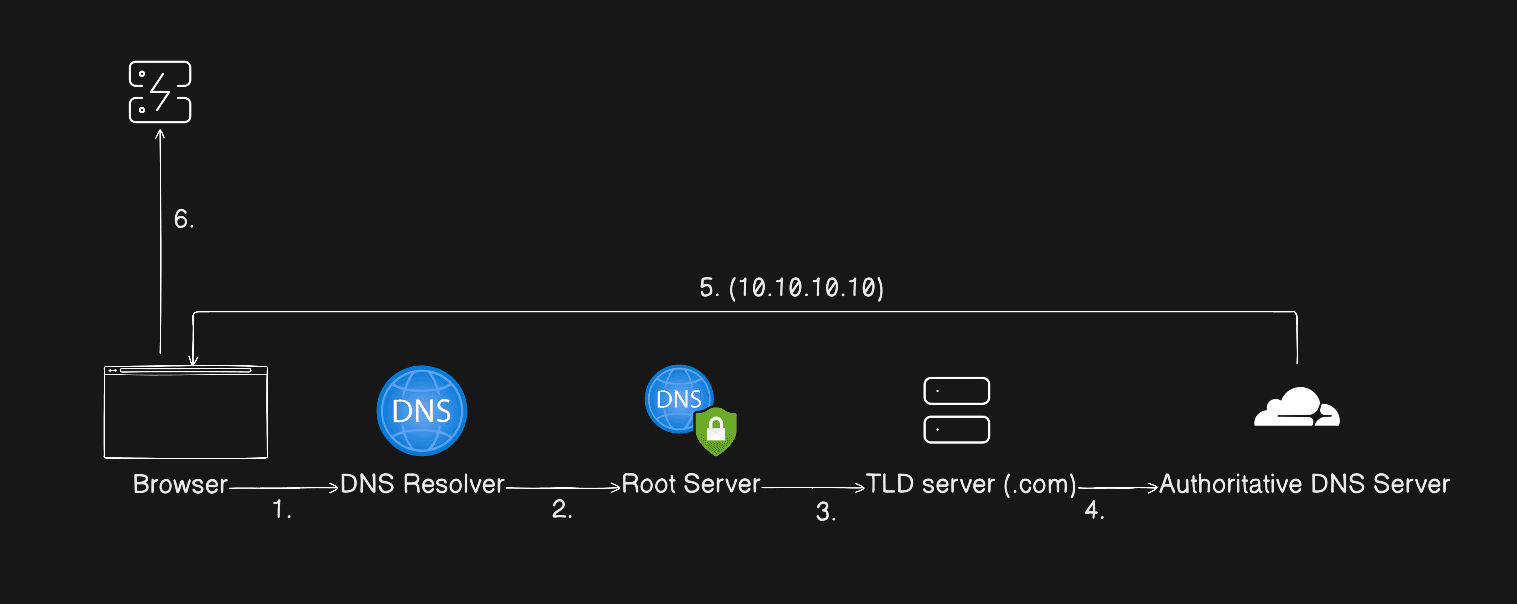
The DNS resolver finds the IP address and gives it back to your computer. Your browser can then connect to that server and request the website.
In many cases, DNS caching makes this process much faster because the IP address may already be stored locally or by the DNS resolver.
Common DNS Records
DNS can store different types of information.
A record — points a domain to an IPv4 address.
example.com → 192.0.2.1
AAAA record — points a domain to an IPv6 address.
example.com → 2001:db8::/32
CNAME — makes one domain name an alias for another.
www.example.com → example.com
MX record — specifies which mail servers handle email for a domain.
example.com. 3600 IN MX 10 mail.example.com.
TXT record — stores text information, commonly used for verification and email security.
example.com. 3600 IN TXT "v=spf1 include:_spf.google.com ~all"
So the next time you type a domain into your browser, remember that before the website loads, DNS is helping your computer figure out where to go.